
Tech Life Journal
Tech Life Journal 
  • Home
  • Categories
    • Innovation
    • Digital Tools
    • Smart Living
    • Health Tech
    • Gear Review
    • Digital Life
    • Tech Travel
    • Voices in Tech
  • Featured
October 15.2025
3 Minutes Read

Why Bose QuietComfort Ultra Earbuds Outshine AirPods for Audiophiles

These Bose earbuds are an easy pick over AirPods for me - why I don't regret it

The Battle for Earbud Supremacy: Bose vs. AirPods

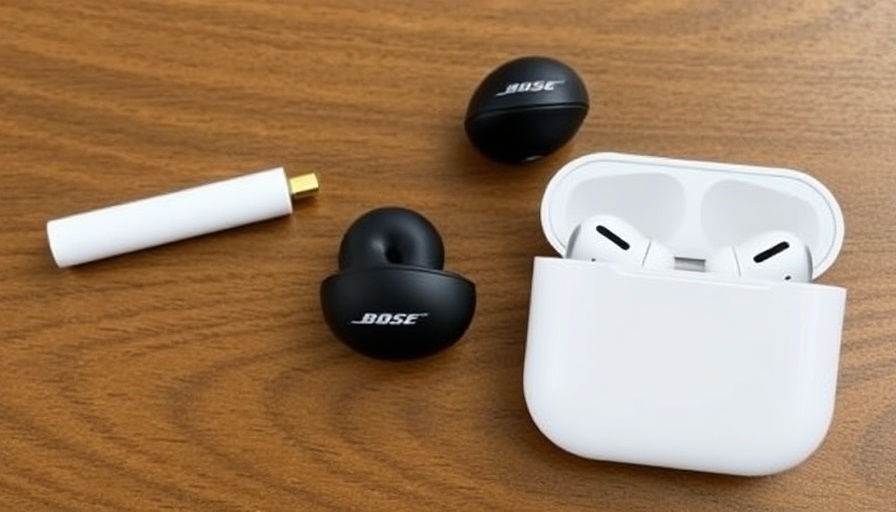
In the competitive world of wireless earbuds, the battle isn't just about sound quality—it’s also a clash of comfort, usability, and technology. The recent release of the Bose QuietComfort Ultra Earbuds (2nd Gen) has drawn attention for their exceptional noise-canceling abilities, often placing them in direct competition with Apple's popular AirPods. With both brands boasting advanced features, how do these earbuds stack up?

Noise Cancellation: Bose Reigns Supreme

Active Noise Cancellation (ANC) has become a significant focal point for consumers seeking an immersive listening experience. The Bose QuietComfort Ultra Earbuds excel in this area, utilizing advanced algorithms and multiple microphones to deliver industry-leading performance. According to reviews from both PCMag and SoundGuys, these earbuds can reduce external noise by nearly 85%—a feat that leaves others, including the AirPods Pro 2, trailing behind.

Immersive Audio Experience to Savor

Though ANC is a standout feature, the audio quality of the Bose QuietComfort Ultra Earbuds is also remarkable. With a bass-friendly tuning, they provide a rich sound profile that caters to pop, rap, and orchestral music alike. This is bolstered by support for high-resolution audio codecs, including aptX Lossless, a feature not commonly found among competitors. Not only is the sound warm and inviting, but it offers enough separation to distinguish between harmonies, crisp vocals, and dynamic range.

Comfort Meets Usability

Designed for all-day wear, the Bose earbuds emphasize comfort, especially for long listening sessions or travel. The ear tips come in three different sizes, ensuring a snug fit for various ear shapes. However, while many reviewers appreciate the comfortable design, some criticize how the touch controls can be finicky, making adjustments cumbersome when on the go—particularly for those used to the seamless interface of AirPods.

Battery Life: Keeping the Music Going

With a rated battery life of approximately 6 hours on a single charge with ANC enabled, the Bose earbuds hold up well against the competition. Though they lag slightly in battery longevity compared to some other models, the case provides multiple recharges, extending total listening time to about 24 hours. Additionally, the inclusion of wireless charging has been welcomed as a practical feature in today’s tech landscape.

Future of Wireless Audio: Where Do We Go From Here?

The market for wireless earbuds continues to grow, driven by consumer demand for quality listening experiences and evolving technology. Major brands like Bose and Apple are likely to keep innovating, leading to enhanced sound quality, battery efficiency, and user satisfaction. As these companies vie for consumer attention, it’s essential to consider what features matter most to you—whether it's sound quality, noise cancellation, design, or ease of use.

Final Thoughts: Choosing the Right Earbuds for You

Ultimately, the choice between Bose's QuietComfort Ultra Earbuds and Apple’s AirPods Pro boils down to personal preference. If you prioritize noise cancellation and an immersive sound experience, Bose may tip the scales in your favor. Conversely, for iPhone users who appreciate seamless integration, the AirPods could prove to be a more convenient option.

As technology advances, staying informed on new releases, reviews, and personal experiences will guide your decision-making process—ensuring that you select earbuds that are perfectly suited for your lifestyle and needs.

Explore the latest in audio technology and discover what fits your soundscape best—whether through Bose, Apple, or the multitude of other brands saturating the market.

Smart Living

0 Comments

Write A Comment

*
*
Please complete the captcha to submit your comment.
Related Posts All Posts
09.10.2026

Unlocking the Secrets of a Successful Smart Home: How to Avoid Common Failures

Update The Smart Home Dilemma: Why So Many Fail As technology advances, the idea of a connected home—one that seamlessly integrates devices to enhance convenience, security, and efficiency—grows increasingly appealing. However, research suggests that most smart homes fail to live up to their promise. Understanding the factors contributing to these failures is crucial for homeowners looking to build a smart home that genuinely improves their quality of life. Common Pitfalls in Smart Home Technology One major reason behind the shortcomings of smart homes is the lack of interoperability between devices. Many homeowners buy varying products from different manufacturers, expecting them to work together cohesively. However, incompatibility can lead to frustration, as devices fail to communicate. This siloed technology often creates a chaotic user experience. Additionally, the overwhelming number of options can make it challenging for consumers to choose the right products. The marketing language used by companies can be technical and confusing, leading potential buyers to make ill-informed choices. Without proper guidance, it is easy to end up with gadgets that simply don’t fit well together. Real-life Consequences: The Impact of Smart Home Failures When smart homes don’t function as intended, it can have severe implications. Security systems that don’t trigger alarms or smart thermostats that malfunction can leave homes vulnerable, causing stress and eroding trust in technology. Moreover, the disconnect can lead to energy inefficiencies, further impacting homeowners’ finances. Failed smart home systems can contribute to additional expenses and even reduce the overall value of a property. Home buyers might be hesitant to invest in a home with known smart tech issues, thereby affecting resale potential. Understanding these factors can help current homeowners and prospective buyers navigate the nuances of modern home technology. Building a Functional Smart Home: Best Practices So, how can homeowners avoid failure and craft a smart home that genuinely works? Firstly, it’s vital to research and invest in equipment known for compatibility and positive reviews. Comprehensive systems like those from leading brands in automation ensure seamless communication. Checking online forums, customer reviews, and expert recommendations can provide additional insight into which products work harmoniously. Additionally, a standardized platform, such as Google Home or Apple HomeKit, can streamline the integration of various devices. These platforms allow users to control all of their smart devices through a central application, eliminating the need to juggle multiple apps from different manufacturers. This level of control can significantly enhance the smart home experience. Future Trends in Smart Home Integration As the market continues to evolve, tech companies are increasingly focusing on establishing universal standards that can unite products from different manufacturers. This movement towards interoperability could signal a turning point, enabling users to create a truly integrated and user-friendly smart home environment. Emerging technologies promise to enhance smart home capabilities dramatically. Innovations such as voice control, machine learning, and artificial intelligence are becoming common, allowing smart systems to learn from user behaviors and preferences, and continually adapt to provide even greater convenience. For instance, advanced AI systems can optimize energy usage based on patterns over time, ultimately saving homeowners money. Embracing Smart Technology: Its Unique Benefits A successful smart home isn’t just about convenience; it can greatly enhance your lifestyle. Imagine a scenario where your coffee maker starts brewing as your alarm goes off, your blinds automatically raise to allow natural light, and your thermostat adjusts to your preferred morning temperature—all orchestrated by a single app. Such tailored experiences illustrate the true potential of smart home technology. Smart homes can also enhance safety and security, providing remote monitoring capabilities. Homeowners can receive alerts on their smartphones when unusual activity is detected, effectively turning them into active participants in their home security. Furthermore, integrating technology can accommodate various lifestyles, making homes more accessible for individuals with disabilities or elderly residents. Challenges and Considerations Despite the advantages, homeowners must tread carefully when designing their smart homes. Issues such as ongoing maintenance, security vulnerabilities, and privacy concerns must be addressed. Homeowners should remain proactive by regularly updating their devices, implementing secure passwords, and utilizing robust cybersecurity measures to protect their connected environments. Moreover, it’s essential to consider whether you really need all the smart features. Sometimes, simpler solutions can offer significant benefits without the complexities that advanced systems can introduce. Homeowners should weigh their needs against the technology available to them, adopting only what fits their lifestyle and enhances their home experience. Final Thoughts: Taking the Leap into Smart Living Investing in a smart home can undoubtedly enrich your everyday life, offering unprecedented convenience and personalization. However, awareness and strategy are essential. By identifying potential pitfalls and emphasizing compatibility, homeowners can build smart homes that thrive. With the right approach, a functional smart home is well within reach, allowing families to reap the numerous benefits of this modern innovation.

08.30.2026

Exploring the Google Pixel 11: A Game-Changer for Smartphone Users

Update How the Google Pixel 11 Reinvents Expectations The Google Pixel 11 promises to challenge the norms of smartphone design with a thoughtful approach to features and usability. In a year where many tech companies lean heavily into extravagant features, the Pixel 11 stands out as a model of accessibility and practicality. Its intuitive design and enhanced capabilities feel both modern and welcoming to users who may find other smartphones overwhelming. The Pixel 11: A Striking First Impression Google has often opted for vibrant designs with the base Pixel models, and the Pixel 11 carries this tradition forward with its eye-catching Hibiscus color. This phone was unboxed with expectations of a standard upgrade, but it immediately captured attention, akin to the classic cinematic trope where the underdog suddenly dazzles everyone. The stunning 6.3-inch AMOLED display truly brings applications to life, allowing users to enjoy content in a refreshingly vibrant way. Excellent Performance in an Evolving Smartphone Landscape Equipped with Google’s Tensor G6 chip, the Pixel 11 focuses on seamless performance rather than just flashy specs. This processor enhances the device's capabilities, allowing it to manage tasks smoothly, a critical factor in today’s fast-paced digital world. With responsive artificial intelligence features, this smartphone caters to users who appreciate direction without unnecessary complexity. The Camera: A Balance of Features and Accessibility Boasting a camera system that is reminiscent of the $1,899 Pro Fold, the Pixel 11 offers incredible performance without the exorbitant price tag. Users no longer have to choose between quality and cost; this model delivers detailed photographs that can satisfy both casual users and photography enthusiasts. This balance of features reflects a growing trend in tech: more manufacturers are prioritizing function and quality over merely presenting a list of high-end specs. Charging Technology: A Convenient Upgrade One of the exciting additions is the Qi2 25W wireless charging capability, making it easier to power up without hassling with cables and adapters. This is indicative of a larger shift towards convenience in technology, where users prefer solutions that simplify their routines. Considering how often smartphones are used daily, the ease of charging resonates with many, further enhancing the Pixel experience. Who Is This Phone For? The Google Pixel 11 appears to cater specifically to users who value a comprehensive smartphone experience without unnecessary frills. With its balance of performance and price, it targets consumers who seek reliability and quality over ultramodern designs that may not be practically applicable. This emerging market segment shows that there is an audience for phones that deliver precisely what users need without added confusion. Predictions for the Future of Smartphones As Google continues to innovate within this balance of accessibility and functionality, I predict that the tech landscape will see increasing demand for devices that echo these priorities. The Pixel 11’s warm reception may encourage other manufacturers to reconsider their positions, potentially leading to a broader shift towards user-centric smartphones. Conclusion: Embracing Change in Technology As the tech world rapidly evolves, the Google Pixel 11 serves as a reminder that sometimes, simpler is better. With its impressive features and beautiful design, it opens up a dialogue about what consumers truly want from their devices. For those considering their next smartphone, it’s clear that giving the Pixel 11 a try may redefine expectations for a smartphone experience.

08.28.2026

Why the Talix Retractable USB-C Cable Is My Lifesaver on Long Car Rides

Update Why a Reliable Charging Cable Is Essential on Family Trips Long car rides can be a test of patience, especially when you have young children in tow. The anxiety of running low on device batteries can add to the stress of a family outing. That's why having a reliable charging solution is crucial, and Talix’s retractable USB-C cable is emerging as a must-have item for parents on the go. The Power and Convenience of Talix’s Retractable USB-C Cable This compact cable proves its worth by supporting an impressive 240W charging power, which means that it can effortlessly charge laptops as well as smartphones. Its retractable design tackles the common issue of tangled cords, making it ideal for car travel where space can be limited. It easily fits into your purse or even a small pocket, neatly resolving the typical hassle of carrying bulky charging cables. Comparative Advantages: A Closer Look at the Market While the Talix cable retails for a modest $22, it’s currently available for an attractive $14 with a coupon on Amazon. This price point puts it in competition with other retractable cables on the market, yet what sets it apart is not just the pricing but its performance. Many retractable cables often suffer from wear and tear, leading to disappointing experiences. However, initial reviews indicate that the Talix model has proved reliable, and user testimonials are favorable concerning its durability and speed. Pain Points: Why Many Cables Fail The vast selection of charging cables may lead to frustration when they don’t work as promised. Some retractable cables are notorious for breaking down after several uses, often discouraging users from opting for such designs in the future. The Talix cable combats this issue, showcasing a strong and efficient retractable mechanism that individuals can trust. Bringing Technology and Convenience Together for Families For parents, finding tech solutions that simplify life can be transformative. The Talix retractable cable provides a solution that not only solves the immediate issue of device charging but also enhances the car ride experience. With charging devices like tablets becoming entertainment staples during long journeys, ensuring that they remain powered can reduce stress for both parents and children. User Experiences Matter: Testimonials and Real-World Uses User reviews highlight how the cable has saved many parents from the chaos of low battery warnings during important moments, such as waiting for a sibling at gymnastics classes or during long road trips. These experiences, shared by fellow parents, may resonate deeply, adding to the cable's appeal. What Lies Ahead? Predictions for Tech and Family Travel As we move into a more technologically endowed travel landscape, it’s clear that the demand for versatile, efficient gadgets like the Talix retractable USB-C cable will only grow. Parents will likely continue to seek tech that seamlessly integrates into their busy lives and facilitates family experiences, allowing them to stay connected even during those lengthy car rides. Embracing such innovation is not merely about convenience; it's about enhancing the overall family experience and ensuring that parents can focus more on creating memories rather than worrying about devices failing on them. As more products like this emerge, families can look forward to more enjoyable, stress-free travel experiences.

Where innovation meets everyday life.

COMPANY

  • Privacy Policy
  • Terms of Use
  • Advertise
  • Contact Us
  • Menu 5
  • Menu 6

ABOUT US

Tech Life Journal explores how technology influences modern living and local business. It features interviews with tech-savvy professionals, insights on smart solutions, and reviews of emerging tools. Perfect for businesses using or creating tech, and readers looking to stay on the cutting edge.

© 2026 CompanyName All Rights Reserved. Address . Contact Us . Terms of Service . Privacy Policy

Terms of Service

Privacy Policy

Core Modal Title

Sorry, no results found

You Might Find These Articles Interesting

T
Please Check Your Email
We Will Be Following Up Shortly
*
*
*
